PriceSync2 Help Center
Step-by-step guides for using PriceSync2a.
Working the Competitors Page
This page shows what other stores charge for the same models. You check their prices, and the page keeps them for the week. Follow the five steps below.
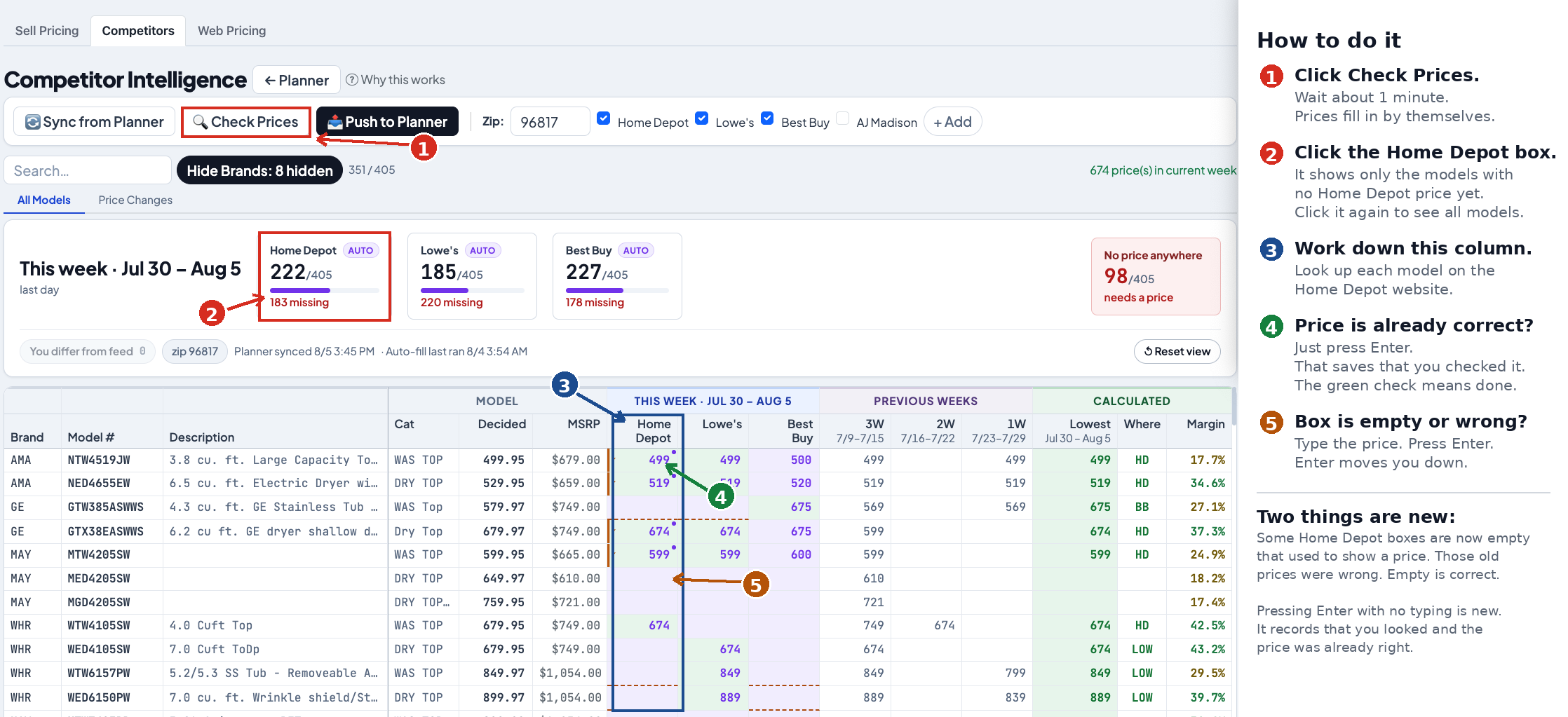
The five steps. Click the picture to open it large.
The five steps
- Click Check Prices. Wait about one minute. Prices fill in by themselves.
- Click the Home Depot box. It shows only the models with no Home Depot price yet. Click it again to see all models.
- Work down this column. Look up each model on the Home Depot website.
- Price is already correct? Just press Enter. That saves that you checked it. The orange check means done.
- Box is empty or wrong? Type the price. Press Enter. Enter moves you down.
Thursday starts a new week
The week runs Thursday to Wednesday. On Thursday morning the page looks almost empty. This is normal. Nothing is broken and nothing was lost. It is a new week, so nobody has checked anything yet.
Last week's numbers are still there. You can see them in the Previous Weeks columns on the right.
Always click Check Prices first
Do this before you start typing. It takes about one minute. The computer looks up many prices for you, so you do not have to type them by hand.
When it finishes, most boxes have a price. Then you only work on the ones that are still empty.
The Home Depot box is a filter
The box near the top says something like 222/405 and 183 missing. That means 222 models have a Home Depot price and 183 do not.
Click the box. The list now shows only the 183 models that need a price. This saves you scrolling past the ones that are already done. Click the box again to see all the models.
The Lowe's box and the Best Buy box work the same way.
Two ways to use Enter
Enter does two different things. Which one depends on whether you typed something.
| What you do | What it means | What you see |
|---|---|---|
| Press Enter and type nothing | “I checked. The price is already right.” | An orange check mark |
| Type a price, then press Enter | “The right price is this one.” | Your new price |
Both are useful. Pressing Enter with nothing typed is not a waste of time. It tells us that a person looked at the real website today. That is different from a price the computer found some days ago.
Either way, Enter moves you down to the next model. So you can work down the column without using the mouse.
If you press Enter twice on the same model, nothing bad happens. It is only saved once.
Some boxes are empty that used to show a price
You may remember a number in a box that is now empty. Empty is correct.
Those old numbers came from earlier weeks. They were wrong. The page used to keep showing an old price after it stopped being true. Now the page only shows prices from this week. If nobody has checked it this week, the box is empty.
An empty box is not a mistake. It means: nobody has looked yet. That is the work.
What you type wins for the rest of the week
The computer checks prices every night. Your price is stronger than the computer's price.
So if you type 499 and the computer later finds 510, the page keeps your 499 for the rest of the week. You do not have to type it again. On Thursday the new week starts and the computer's price is used again until someone checks it.
This also means you can trust what you see. If you fixed it, it stays fixed.
“No price anywhere”
The red box on the right says No price anywhere. This counts the models with no price from any store this week — not Home Depot, not Lowe's, not Best Buy.
These models are the most important ones. Without a competitor price, we are guessing at our own price. If that number is high, those models need someone to look them up by hand.
If you are not sure
- Hold the mouse over a price. A small note tells you when we last checked, and how old the computer's price is.
- A price with an orange check was confirmed by a person. (Orange, not green, on purpose: green already marks the lowest price in the row, so a green tick would read as “this is the low” on every cell that isn’t.)
- If you type the wrong number, just type the right one and press Enter again. The newest one wins.